At any stage of the application process, you can change the application type within the client's application. In some instances, this may happen when a sole trader changes their mind and would prefer to apply for a business loan, rather than a consumer loan.
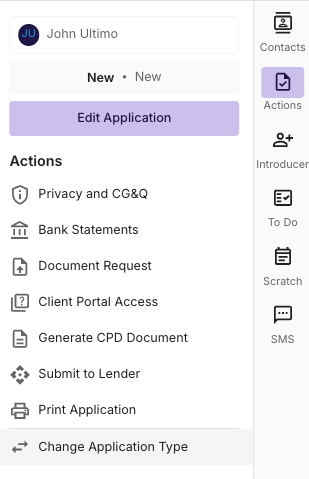
To Change Application Type (i.e from consumer to commercial) navigate to the “Actions” tab on the right hand side of the deal. Then click Change Application Type.
Once the Change application type has been selected you can change the structure and the purpose of the application.
Application Type: Individual
An Individual application for consumer/personal use should have No selected when asked “is this for at least 50% business use?”
An Individual application for business use should have Yes selected when asked “is this for at least 50% business use?” - This is typical for Sole traders and PAYG Chattels.
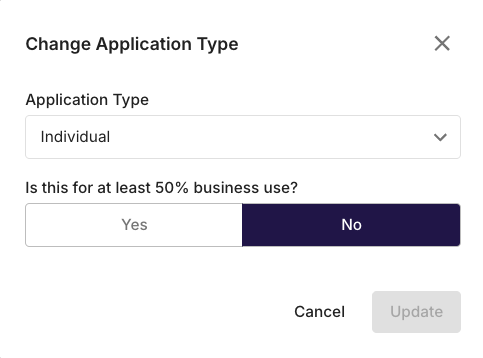
*Note. An individual application with Yes selected when asked “is this for at least 50% business use?” will follow commercial compliance pathways and will not be legislated under the NCCP Regulations.
Application Type: Business
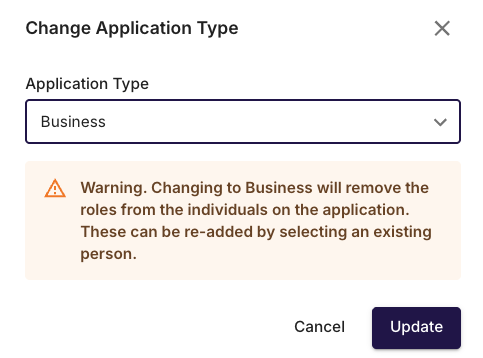
Applications where the applicant is a Company, Trust or Partnership the Business application type should be used.
When changing to a Business application type from an Individual application type, you will be prompted with a warning, letting you know that some data and individual information may be removed (i.e Non-Borrowing spouse information, preferences and priorities). This information can be re-added at any stage.
Application Type: Commercial
The application Type Commercial is to be used for Commercial property and significant transactions that require a credit paper driven application.
Please reach out to your state based commercial specialist for support on commercial property applications if required.